> ## Documentation Index
> Fetch the complete documentation index at: https://docs-staging-chore-myaccount-api-autoupdate.mintlify.site/llms.txt
> Use this file to discover all available pages before exploring further.

> Learn how to configure your HTTP Vault Connections to authorize HTTP requests to external APIs or services.

# HTTP Vault Connection

## Configure your HTTP Vault Connection Options

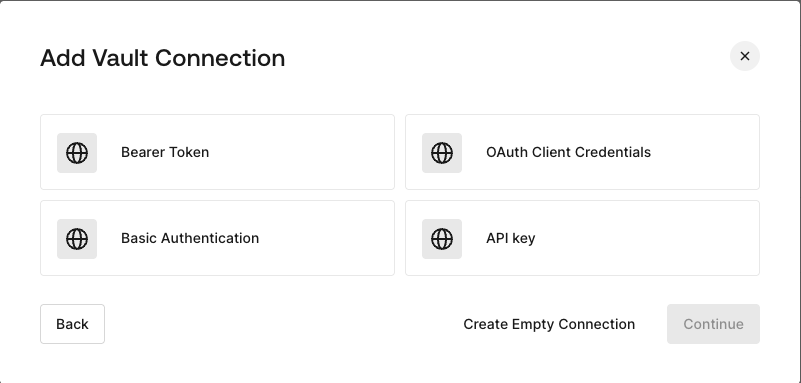
HTTP Vault Connection can be configure with different authentication options and then be used at your HTTP Request Flow Actions.
<Frame>
  <img src="https://mintcdn.com/docs-staging-chore-myaccount-api-autoupdate/1Z1q5NiJbrI0viLT/docs/images/customize/forms/vaults/http-vault-connection-options.png?fit=max&auto=format&n=1Z1q5NiJbrI0viLT&q=85&s=443cd7a81b571c65cb4610924f943b68" alt="Dashboard > Actions > Forms > Vault > HTTP" data-og-width="801" width="801" data-og-height="383" height="383" data-path="docs/images/customize/forms/vaults/http-vault-connection-options.png" data-optimize="true" data-opv="3" srcset="https://mintcdn.com/docs-staging-chore-myaccount-api-autoupdate/1Z1q5NiJbrI0viLT/docs/images/customize/forms/vaults/http-vault-connection-options.png?w=280&fit=max&auto=format&n=1Z1q5NiJbrI0viLT&q=85&s=c04813c0040d837d332a66667d28afb2 280w, https://mintcdn.com/docs-staging-chore-myaccount-api-autoupdate/1Z1q5NiJbrI0viLT/docs/images/customize/forms/vaults/http-vault-connection-options.png?w=560&fit=max&auto=format&n=1Z1q5NiJbrI0viLT&q=85&s=86d8ac713f4169088fd1e9ab6a4b920c 560w, https://mintcdn.com/docs-staging-chore-myaccount-api-autoupdate/1Z1q5NiJbrI0viLT/docs/images/customize/forms/vaults/http-vault-connection-options.png?w=840&fit=max&auto=format&n=1Z1q5NiJbrI0viLT&q=85&s=ba6057792d6c2809abaf6ccb1cbcaf39 840w, https://mintcdn.com/docs-staging-chore-myaccount-api-autoupdate/1Z1q5NiJbrI0viLT/docs/images/customize/forms/vaults/http-vault-connection-options.png?w=1100&fit=max&auto=format&n=1Z1q5NiJbrI0viLT&q=85&s=dafe5bcfb72ca475f1994df7967d3bb4 1100w, https://mintcdn.com/docs-staging-chore-myaccount-api-autoupdate/1Z1q5NiJbrI0viLT/docs/images/customize/forms/vaults/http-vault-connection-options.png?w=1650&fit=max&auto=format&n=1Z1q5NiJbrI0viLT&q=85&s=561b3169e2a35b521cc0b96a7def37de 1650w, https://mintcdn.com/docs-staging-chore-myaccount-api-autoupdate/1Z1q5NiJbrI0viLT/docs/images/customize/forms/vaults/http-vault-connection-options.png?w=2500&fit=max&auto=format&n=1Z1q5NiJbrI0viLT&q=85&s=097656a6e4a672f5be5e4d4c1a832dad 2500w" />
</Frame>

## Configure your HTTP Vault Connection for Bearer Token

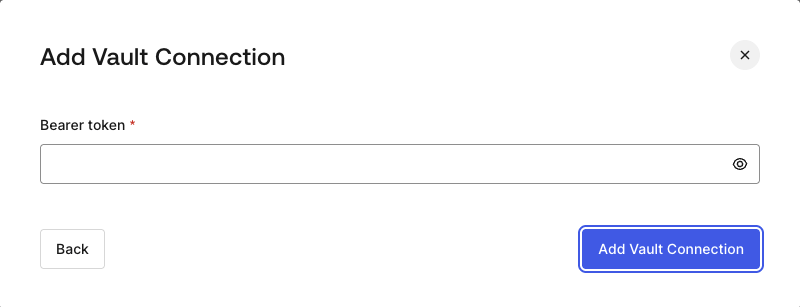
To configure a HTTP Vault Connection using **Bearer Token** authorization, you need to set the required parameters.
<Frame>
  <img src="https://mintcdn.com/docs-staging-chore-myaccount-api-autoupdate/1Z1q5NiJbrI0viLT/docs/images/customize/forms/vaults/http-vault-connection-bearer-token.png?fit=max&auto=format&n=1Z1q5NiJbrI0viLT&q=85&s=1b807dc5b4872b0dfe574a76ee1a1f07" alt="Dashboard > Actions > Forms > Vault > HTTP" data-og-width="800" width="800" data-og-height="307" height="307" data-path="docs/images/customize/forms/vaults/http-vault-connection-bearer-token.png" data-optimize="true" data-opv="3" srcset="https://mintcdn.com/docs-staging-chore-myaccount-api-autoupdate/1Z1q5NiJbrI0viLT/docs/images/customize/forms/vaults/http-vault-connection-bearer-token.png?w=280&fit=max&auto=format&n=1Z1q5NiJbrI0viLT&q=85&s=457124a3eae1756b7a19bbe4f9e9ffd8 280w, https://mintcdn.com/docs-staging-chore-myaccount-api-autoupdate/1Z1q5NiJbrI0viLT/docs/images/customize/forms/vaults/http-vault-connection-bearer-token.png?w=560&fit=max&auto=format&n=1Z1q5NiJbrI0viLT&q=85&s=b2a068deacab76fd1e2889b57e829b2f 560w, https://mintcdn.com/docs-staging-chore-myaccount-api-autoupdate/1Z1q5NiJbrI0viLT/docs/images/customize/forms/vaults/http-vault-connection-bearer-token.png?w=840&fit=max&auto=format&n=1Z1q5NiJbrI0viLT&q=85&s=3081d96bec09295ca82e5b3407313abd 840w, https://mintcdn.com/docs-staging-chore-myaccount-api-autoupdate/1Z1q5NiJbrI0viLT/docs/images/customize/forms/vaults/http-vault-connection-bearer-token.png?w=1100&fit=max&auto=format&n=1Z1q5NiJbrI0viLT&q=85&s=b74dc915f7b25caa763e54a5c21122aa 1100w, https://mintcdn.com/docs-staging-chore-myaccount-api-autoupdate/1Z1q5NiJbrI0viLT/docs/images/customize/forms/vaults/http-vault-connection-bearer-token.png?w=1650&fit=max&auto=format&n=1Z1q5NiJbrI0viLT&q=85&s=9ea38933cca2c2b94f94ebf9263bf6f7 1650w, https://mintcdn.com/docs-staging-chore-myaccount-api-autoupdate/1Z1q5NiJbrI0viLT/docs/images/customize/forms/vaults/http-vault-connection-bearer-token.png?w=2500&fit=max&auto=format&n=1Z1q5NiJbrI0viLT&q=85&s=270db12386c3bc8ea6348463ab5a1d4b 2500w" />
</Frame>

### Input settings

| Parameter    | Description                                           |
| ------------ | ----------------------------------------------------- |
| Bearer Token | Static token used for external service authorization. |

## Configure your HTTP Vault Connection for OAuth Client Credentials

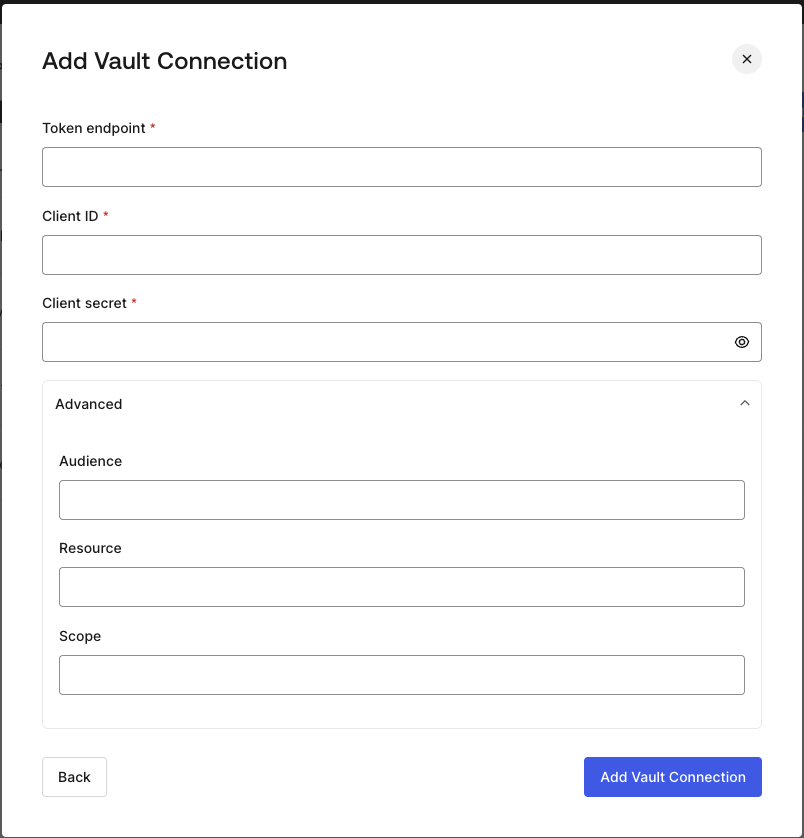
To configure a HTTP Vault Connection using **Client Credentials** authorization, you need to set the required parameters.
<Frame>
  <img src="https://mintcdn.com/docs-staging-chore-myaccount-api-autoupdate/1Z1q5NiJbrI0viLT/docs/images/customize/forms/vaults/http-vault-connection-oauth-client-credentials.png?fit=max&auto=format&n=1Z1q5NiJbrI0viLT&q=85&s=8cfd0cd30a53d2a00d36517cb19f59b2" alt="Dashboard > Actions > Forms > Vault > HTTP " data-og-width="804" width="804" data-og-height="838" height="838" data-path="docs/images/customize/forms/vaults/http-vault-connection-oauth-client-credentials.png" data-optimize="true" data-opv="3" srcset="https://mintcdn.com/docs-staging-chore-myaccount-api-autoupdate/1Z1q5NiJbrI0viLT/docs/images/customize/forms/vaults/http-vault-connection-oauth-client-credentials.png?w=280&fit=max&auto=format&n=1Z1q5NiJbrI0viLT&q=85&s=6086a29986037e455de84d5c7f4d8ce7 280w, https://mintcdn.com/docs-staging-chore-myaccount-api-autoupdate/1Z1q5NiJbrI0viLT/docs/images/customize/forms/vaults/http-vault-connection-oauth-client-credentials.png?w=560&fit=max&auto=format&n=1Z1q5NiJbrI0viLT&q=85&s=99630f30320a9f9ae4b3fae8b0f8bbc0 560w, https://mintcdn.com/docs-staging-chore-myaccount-api-autoupdate/1Z1q5NiJbrI0viLT/docs/images/customize/forms/vaults/http-vault-connection-oauth-client-credentials.png?w=840&fit=max&auto=format&n=1Z1q5NiJbrI0viLT&q=85&s=e609184c1630fd785e73367df248166c 840w, https://mintcdn.com/docs-staging-chore-myaccount-api-autoupdate/1Z1q5NiJbrI0viLT/docs/images/customize/forms/vaults/http-vault-connection-oauth-client-credentials.png?w=1100&fit=max&auto=format&n=1Z1q5NiJbrI0viLT&q=85&s=6da94a2226c995da63f463f7c721f98a 1100w, https://mintcdn.com/docs-staging-chore-myaccount-api-autoupdate/1Z1q5NiJbrI0viLT/docs/images/customize/forms/vaults/http-vault-connection-oauth-client-credentials.png?w=1650&fit=max&auto=format&n=1Z1q5NiJbrI0viLT&q=85&s=89332a217711af47033be96a3ceddab5 1650w, https://mintcdn.com/docs-staging-chore-myaccount-api-autoupdate/1Z1q5NiJbrI0viLT/docs/images/customize/forms/vaults/http-vault-connection-oauth-client-credentials.png?w=2500&fit=max&auto=format&n=1Z1q5NiJbrI0viLT&q=85&s=afd685f3316726da1e3a229793b81b1f 2500w" />
</Frame>

### Input settings

| Parameter           | Description                                                               |
| ------------------- | ------------------------------------------------------------------------- |
| Tenant Endpoint     | Tenant Endpoint of the Authorization Server issuing the Access Tokens.    |
| Client ID           | Client ID of your M2M Application authorized for Custom API.              |
| Client Secret       | Client Secret of your M2M Application authorized for Custom API.          |
| Audience (Optional) | Custom API Audience. Normally used for Custom APIs defined in Auth0.      |
| Resource (Optional) | Custom API Resource. Standard parameter with similar meaning of Audience. |
| Scope (Optional)    | Scope list in string format separated by spaces.                          |

## Configure your HTTP Vault Connection for API Key

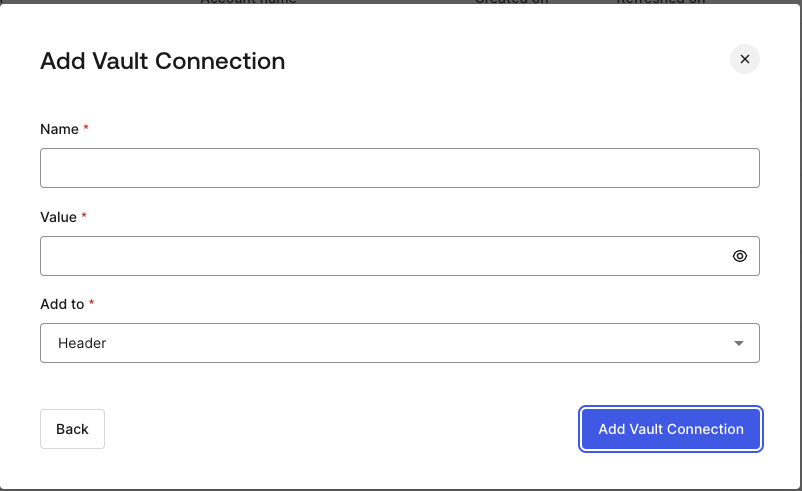
To configure a HTTP Vault Connection using **API Key** authorization, you need to set the required parameters.
<Frame>
  <img src="https://mintcdn.com/docs-staging-chore-myaccount-api-autoupdate/1Z1q5NiJbrI0viLT/docs/images/customize/forms/vaults/http-vault-connection-api-key.png?fit=max&auto=format&n=1Z1q5NiJbrI0viLT&q=85&s=ad5837f872431fc791d06074291c6212" alt="Dashboard > Actions > Forms > Vault > HTTP " data-og-width="802" width="802" data-og-height="491" height="491" data-path="docs/images/customize/forms/vaults/http-vault-connection-api-key.png" data-optimize="true" data-opv="3" srcset="https://mintcdn.com/docs-staging-chore-myaccount-api-autoupdate/1Z1q5NiJbrI0viLT/docs/images/customize/forms/vaults/http-vault-connection-api-key.png?w=280&fit=max&auto=format&n=1Z1q5NiJbrI0viLT&q=85&s=324d9bb5e3465a047b831d2a88d19502 280w, https://mintcdn.com/docs-staging-chore-myaccount-api-autoupdate/1Z1q5NiJbrI0viLT/docs/images/customize/forms/vaults/http-vault-connection-api-key.png?w=560&fit=max&auto=format&n=1Z1q5NiJbrI0viLT&q=85&s=9f3613b0d2a17691522e485ba8758482 560w, https://mintcdn.com/docs-staging-chore-myaccount-api-autoupdate/1Z1q5NiJbrI0viLT/docs/images/customize/forms/vaults/http-vault-connection-api-key.png?w=840&fit=max&auto=format&n=1Z1q5NiJbrI0viLT&q=85&s=6955a48e665c1d9c1138fd217265f037 840w, https://mintcdn.com/docs-staging-chore-myaccount-api-autoupdate/1Z1q5NiJbrI0viLT/docs/images/customize/forms/vaults/http-vault-connection-api-key.png?w=1100&fit=max&auto=format&n=1Z1q5NiJbrI0viLT&q=85&s=aeffa22c0568fe30becc64b5aadd829c 1100w, https://mintcdn.com/docs-staging-chore-myaccount-api-autoupdate/1Z1q5NiJbrI0viLT/docs/images/customize/forms/vaults/http-vault-connection-api-key.png?w=1650&fit=max&auto=format&n=1Z1q5NiJbrI0viLT&q=85&s=4e4e8f9a8e68f51a9192e29b3a21fa25 1650w, https://mintcdn.com/docs-staging-chore-myaccount-api-autoupdate/1Z1q5NiJbrI0viLT/docs/images/customize/forms/vaults/http-vault-connection-api-key.png?w=2500&fit=max&auto=format&n=1Z1q5NiJbrI0viLT&q=85&s=77d88b6fb84a3052ddb421aa6c7c54a8 2500w" />
</Frame>

### Input settings

| Parameter | Description                                                                                  |
| --------- | -------------------------------------------------------------------------------------------- |
| Name      | API Key name to be added as Header or Query parameter.                                       |
| Value     | API Key value to be added as Header or Query parameter.                                      |
| Add To    | By default, it's Header. Determines whether to add the API Key as Header or Query parameter. |

## Configure your HTTP Vault Connection for Basic Authentication

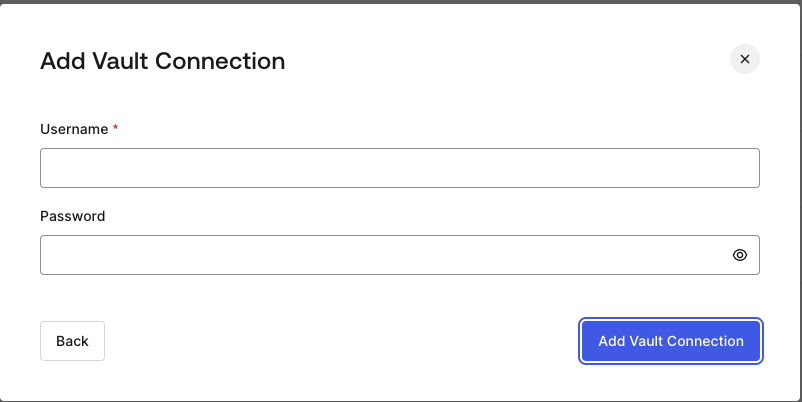
To configure a HTTP Vault Connection using **Basic Auth** authorization, you need to set the required parameters.
<Frame>
  <img src="https://mintcdn.com/docs-staging-chore-myaccount-api-autoupdate/1Z1q5NiJbrI0viLT/docs/images/customize/forms/vaults/http-vault-connection-basic-authentication.png?fit=max&auto=format&n=1Z1q5NiJbrI0viLT&q=85&s=aa03e75b402fb58e99e8a9e49e87930e" alt="Dashboard > Actions > Forms > Vault > HTTP " data-og-width="802" width="802" data-og-height="402" height="402" data-path="docs/images/customize/forms/vaults/http-vault-connection-basic-authentication.png" data-optimize="true" data-opv="3" srcset="https://mintcdn.com/docs-staging-chore-myaccount-api-autoupdate/1Z1q5NiJbrI0viLT/docs/images/customize/forms/vaults/http-vault-connection-basic-authentication.png?w=280&fit=max&auto=format&n=1Z1q5NiJbrI0viLT&q=85&s=59068142afa0462ef6bd90da9a3d6f94 280w, https://mintcdn.com/docs-staging-chore-myaccount-api-autoupdate/1Z1q5NiJbrI0viLT/docs/images/customize/forms/vaults/http-vault-connection-basic-authentication.png?w=560&fit=max&auto=format&n=1Z1q5NiJbrI0viLT&q=85&s=8608c2f43956b495f6bdb0a95042e9fd 560w, https://mintcdn.com/docs-staging-chore-myaccount-api-autoupdate/1Z1q5NiJbrI0viLT/docs/images/customize/forms/vaults/http-vault-connection-basic-authentication.png?w=840&fit=max&auto=format&n=1Z1q5NiJbrI0viLT&q=85&s=e5330f60e6f9af1fe3e9cf2231ace249 840w, https://mintcdn.com/docs-staging-chore-myaccount-api-autoupdate/1Z1q5NiJbrI0viLT/docs/images/customize/forms/vaults/http-vault-connection-basic-authentication.png?w=1100&fit=max&auto=format&n=1Z1q5NiJbrI0viLT&q=85&s=d51934705fd5de938cd5010ee00895e1 1100w, https://mintcdn.com/docs-staging-chore-myaccount-api-autoupdate/1Z1q5NiJbrI0viLT/docs/images/customize/forms/vaults/http-vault-connection-basic-authentication.png?w=1650&fit=max&auto=format&n=1Z1q5NiJbrI0viLT&q=85&s=33486039a3ecb85d03a5809250d70a6f 1650w, https://mintcdn.com/docs-staging-chore-myaccount-api-autoupdate/1Z1q5NiJbrI0viLT/docs/images/customize/forms/vaults/http-vault-connection-basic-authentication.png?w=2500&fit=max&auto=format&n=1Z1q5NiJbrI0viLT&q=85&s=070308ccd9356f3628021786c9ee58c4 2500w" />
</Frame>

### Input settings

| Parameter | Description                                                                                         |
| --------- | --------------------------------------------------------------------------------------------------- |
| Username  | Username to be concatenated and base64 encoded, then added as Basic Authorization Header parameter. |
| Password  | Password to be concatenated and base64 encoded, then added as Basic Authorization Header parameter. |

<Warning>
  HTTP Vault Connection with Basic Auth configuration, is looking forward to replace the currently built-in option at Flows HTTP Request Action.
</Warning>
