> ## Documentation Index
> Fetch the complete documentation index at: https://docs-staging-chore-myaccount-api-autoupdate.mintlify.site/llms.txt
> Use this file to discover all available pages before exploring further.

> Flows を使用してサーバー側ロジックを構築し、Forms に決定ロジックや外部連携を追加する方法を学びます。

# Flows

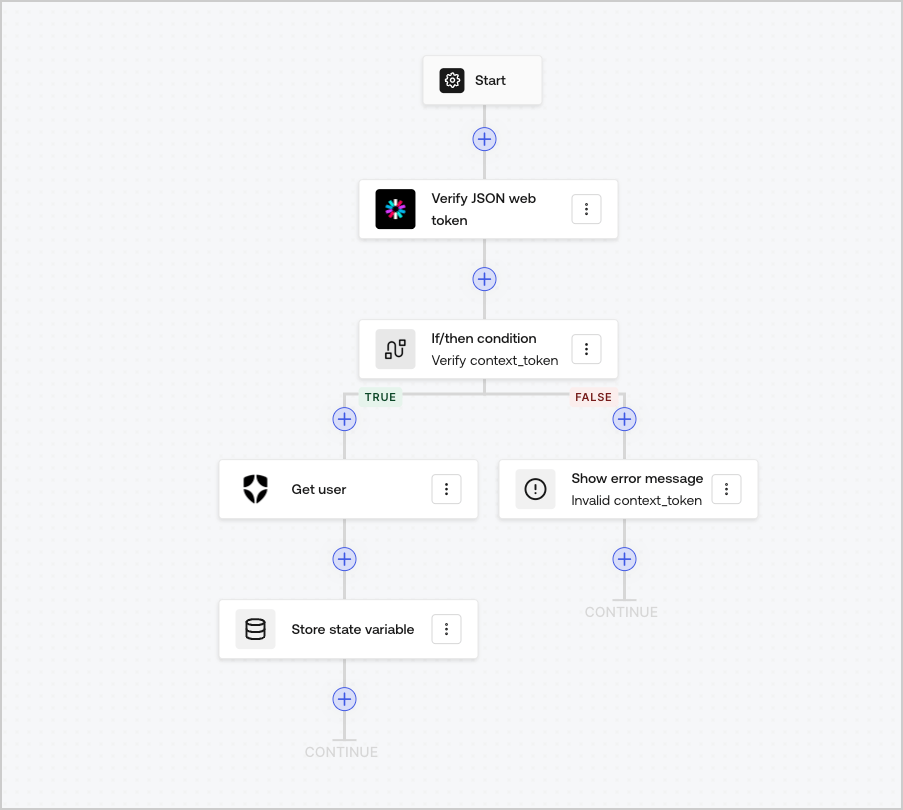
Flows を使用すると、Forms 内で実行するサーバー側ロジックを視覚的に構築し、収集した情報を処理したり、API を介してさまざまなサービスと連携したり、自動化をトリガーしたりできます。
<Frame>
  <img src="https://mintcdn.com/docs-staging-chore-myaccount-api-autoupdate/o1UR_wVpl9p5EHsG/docs/images/cdy7uua7fh8z/6u6Huh5CbH3GEQJv3AH7cx/e49ea613b2c46a43c83c89ffecddbafe/Flows.png?fit=max&auto=format&n=o1UR_wVpl9p5EHsG&q=85&s=f4f6af1f2589dbf95c56c3ba5c5825ce" alt="Dashboard > Forms > Flows" data-og-width="903" width="903" data-og-height="810" height="810" data-path="docs/images/cdy7uua7fh8z/6u6Huh5CbH3GEQJv3AH7cx/e49ea613b2c46a43c83c89ffecddbafe/Flows.png" data-optimize="true" data-opv="3" srcset="https://mintcdn.com/docs-staging-chore-myaccount-api-autoupdate/o1UR_wVpl9p5EHsG/docs/images/cdy7uua7fh8z/6u6Huh5CbH3GEQJv3AH7cx/e49ea613b2c46a43c83c89ffecddbafe/Flows.png?w=280&fit=max&auto=format&n=o1UR_wVpl9p5EHsG&q=85&s=1cf4c65a351b7cf6db3bb3e3529ac3a5 280w, https://mintcdn.com/docs-staging-chore-myaccount-api-autoupdate/o1UR_wVpl9p5EHsG/docs/images/cdy7uua7fh8z/6u6Huh5CbH3GEQJv3AH7cx/e49ea613b2c46a43c83c89ffecddbafe/Flows.png?w=560&fit=max&auto=format&n=o1UR_wVpl9p5EHsG&q=85&s=8044dc46c5c87c79f53bcb6e2ea0c81e 560w, https://mintcdn.com/docs-staging-chore-myaccount-api-autoupdate/o1UR_wVpl9p5EHsG/docs/images/cdy7uua7fh8z/6u6Huh5CbH3GEQJv3AH7cx/e49ea613b2c46a43c83c89ffecddbafe/Flows.png?w=840&fit=max&auto=format&n=o1UR_wVpl9p5EHsG&q=85&s=d20e8a47b6a3a19f6587dd9baef91052 840w, https://mintcdn.com/docs-staging-chore-myaccount-api-autoupdate/o1UR_wVpl9p5EHsG/docs/images/cdy7uua7fh8z/6u6Huh5CbH3GEQJv3AH7cx/e49ea613b2c46a43c83c89ffecddbafe/Flows.png?w=1100&fit=max&auto=format&n=o1UR_wVpl9p5EHsG&q=85&s=5c8ddfede1a7c40e762334dfe13acd00 1100w, https://mintcdn.com/docs-staging-chore-myaccount-api-autoupdate/o1UR_wVpl9p5EHsG/docs/images/cdy7uua7fh8z/6u6Huh5CbH3GEQJv3AH7cx/e49ea613b2c46a43c83c89ffecddbafe/Flows.png?w=1650&fit=max&auto=format&n=o1UR_wVpl9p5EHsG&q=85&s=8d0cbf076e7cda3b10d3ff3fe9dce284 1650w, https://mintcdn.com/docs-staging-chore-myaccount-api-autoupdate/o1UR_wVpl9p5EHsG/docs/images/cdy7uua7fh8z/6u6Huh5CbH3GEQJv3AH7cx/e49ea613b2c46a43c83c89ffecddbafe/Flows.png?w=2500&fit=max&auto=format&n=o1UR_wVpl9p5EHsG&q=85&s=bc1895c5508f1ffa4f6211d57c6eb8f8 2500w" />
</Frame>

Flows のアクションは、フォームで次のように使用できます。

* フォームの各ステップに対して、カスタムのサーバー側検証を作成する。
* カスタム HTTP リクエストを実行して、独自の API と連携する。
* すぐに使える連携機能を使用して、サードパーティと統合する。
* ユーザー入力やプロパティに基づいて、異なるビジネスロジックを実行する。
* <Tooltip tip="JSON Web Token (JWT): 2 者間でクレームを安全に表現するために使用される標準的な ID Token の形式（多くの場合、アクセストークンの形式としても使用されます）。" cta="用語集を見る" href="/docs/ja-jp/glossary?term=JSON+Web+Tokens">JSON Web Tokens</Tooltip> を使用してデータを検証する。
